
You find a refurbished laptop that fits your budget. The specs look good. You’re seconds away from clicking “Add to Cart.”
Then you spot the RAM and SSD upgrade options.
Now comes the question almost every buyer asks: Should I leave everything as it is, or spend a little extra on upgrades?
The answer can affect how happy you are with your refurbished refurbished laptop six months from now. A refurbished laptop that feels fast and spacious today can feel very different once it’s filled with files, software, browser tabs, and daily work.
That’s why it’s worth spending a few minutes looking at the upgrade options available on Tech Bazar before placing your order.
How Do You Upgrade RAM and SSD While Ordering from Tech Bazar?
The process is straightforward.
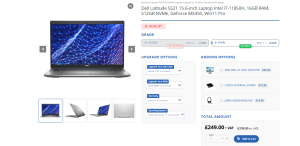
When you’re viewing a refurbished laptop on Tech Bazar, you’ll usually see available upgrade options on the product page. Depending on the model, you may be able to increase the RAM, choose a larger SSD, extend the warranty, or add accessories.
Before adding the refurbished laptop to your cart, simply select the upgrades you want. Once the order is placed, Tech Bazar installs the selected components before shipping the refurbished laptop.
When it arrives, everything is already set up and ready to go.
What RAM and SSD Configuration Should You Choose?
This is where many buyers get stuck.
The best setup isn’t always the biggest one. It’s the one that matches the way you’ll actually use the refurbished laptop.
| Usage | Recommended RAM | Recommended SSD |
| Browsing, emails, streaming, social media | 8GB | 256GB SSD |
| School work, college assignments, Microsoft Office | 8GB – 16GB | 256GB – 512GB SSD |
| Office work, remote work, multitasking | 16GB | 512GB SSD |
| Business software and large spreadsheets | 16GB | 512GB SSD |
| Graphic design and photo editing | 16GB – 32GB | 512GB – 1TB SSD |
| Video editing and content creation | 32GB | 1TB SSD |
| Programming and virtual machines | 16GB – 32GB | 1TB SSD |
If you’re not sure where you fit, 16GB RAM and a 512GB SSD is usually a safe choice for a wide range of users.
It gives you enough memory for multitasking and enough storage to avoid constantly checking how much free space is left.
8GB RAM or 16GB RAM?
If you’re mainly using your refurbished laptop for browsing, emails, Microsoft Office, online classes, and streaming, 8GB RAM is still enough for everyday use.
If you regularly keep multiple browser tabs open, join video meetings, work on spreadsheets, switch between applications, or plan to keep the refurbished laptop for several years, 16GB RAM is usually the better choice.
In 2026, 16GB has become the recommended option as modern software and web browsers use more memory than they did a few years ago.
16GB RAM offers the best balance of performance, future-proofing, and value. If your budget allows it, it’s one of the upgrades you’ll appreciate every day.
What Upgrade Gives the Best Value?
If there is one upgrade combination that suits a large number of buyers, it’s 16GB RAM paired with a 512GB SSD.
It works well for:
- Students
- Remote workers
- Office users
- Business users
- Freelancers
- Everyday home users
You’re getting extra memory for smoother multitasking and enough storage for applications, documents, photos, videos, and future growth.
For many people, this is the point where performance, storage, and budget come together effectively.
What Mistakes Should You Avoid?
One mistake is buying storage based only on what you need right now.
The laptop you order today will probably hold a lot more files a year from now.
Another mistake is upgrading storage while ignoring RAM, even though your daily work involves switching between multiple applications. Both upgrades play different roles, and a balanced setup usually feels better to use.
It also helps to think ahead. If you plan to keep your refurbished laptop for three, four, or five years, choosing the right upgrades today can save you from spending money again later.
Final Thoughts
A refurbished laptop already offers excellent value. Choosing the right RAM and SSD upgrades helps you get even more from that purchase.
Before you place your order, take a quick look at the upgrade options available on the product page. Spending a little extra now can save you from future upgrades, storage headaches, and performance frustrations down the road.
Found a refurbished laptop you like? Check the upgrade options before checkout and build a setup that feels right from day one. Your future self will thank you every time the laptop powers on, opens files quickly, and still has room left when you need it.
